Grow For Good: On why your social stats have been thrown into chaos, and what to do

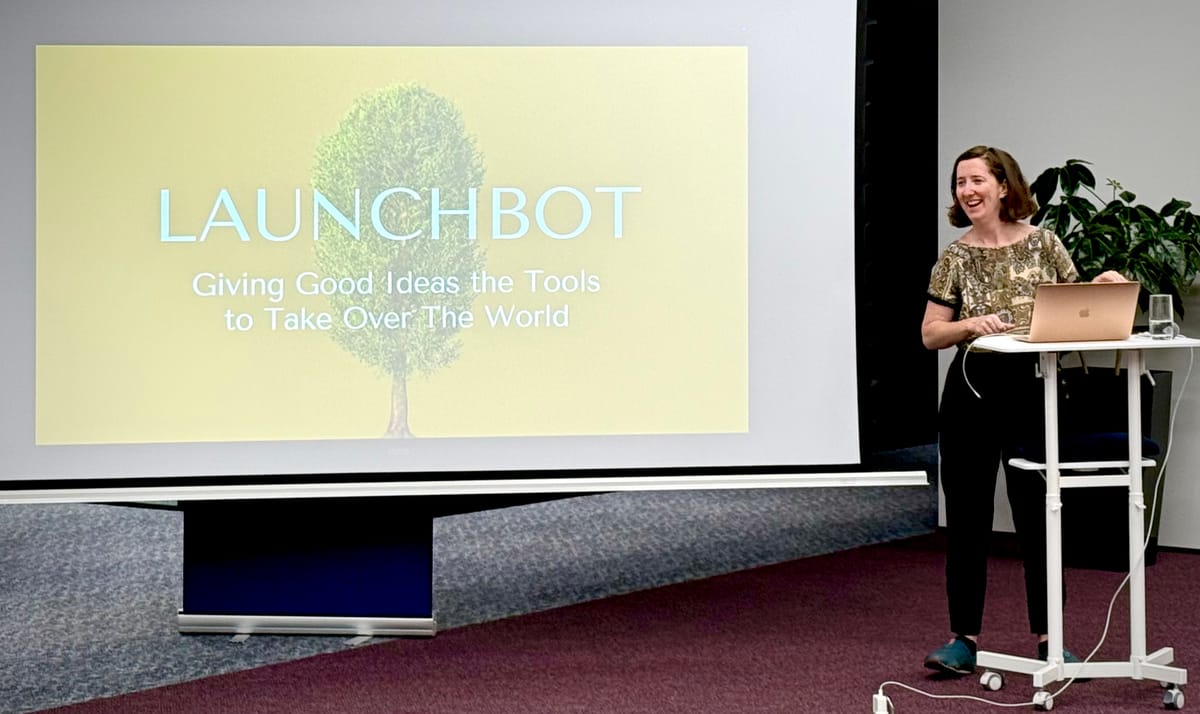
It's been a big month! It was my daughter's 4th birthday, I spoke at the AI Engineers meetup in Wellington, and Ads Launch moved out into the world. Meta is also rolling out its game-changing Andromeda update, Google's AI Mode has arrived, all your social stats have been thrown into chaos and you're wondering how to get your bases in order for Xmas and the new year!
Never fear. I'll help you with all these developments later in the newsletter. I can also help out as a Growth Advisor, scroll to the bottom for more info. For now, some quick updates from Launchbot.
Ads Launch makes gains
Timo from We Love Local in Kapiti has furnished us with this splendiferous testimony:
I've stayed away from Meta for the last few years because tracking purchases became tricky. This tool made things manageable by analysing our Google Analytics and suggesting an audience, which means you can skip all the wrestling with Facebook Ads Manager.
I'm not a developer or marketer, more a generalist who handles most things myself with lots of tinkering involved. Having a tool that gives me control without the usual headaches has made life easier.”
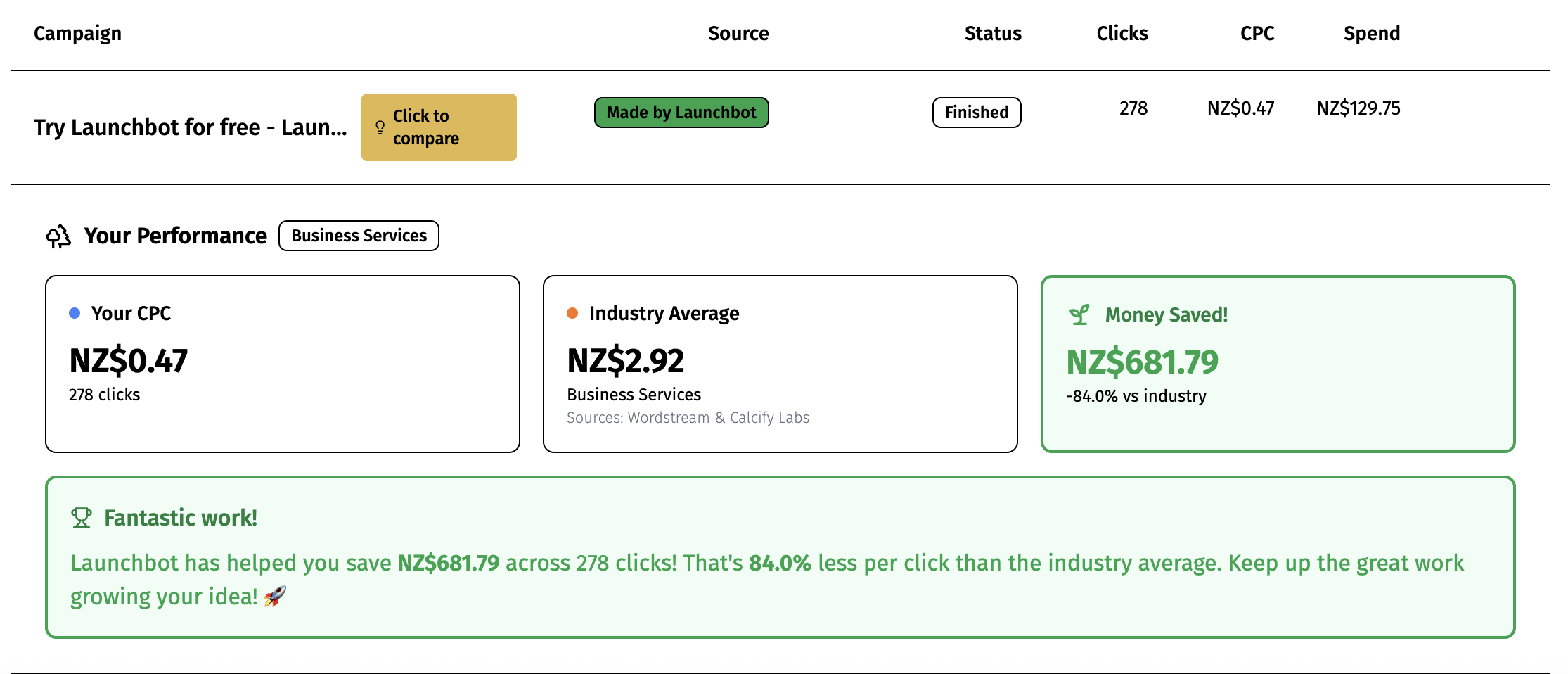
TWELVE CENTS!!!!!!
Remember the days of looking at your Meta Ads, you'd spent hundreds of dollars and the results were ..... nothing? Launchbot is simply obliterating that, letting you utilize the world's biggest social network to reach the right people without the painful bills.
On average, Ads Launch users have been getting 100 website visitors for $39 using Launchbot, as opposed to $220 alone. And we're just warming up!
Give Ads Launch a go and enjoy your own "WTF YUSS" moment.
How to adjust to the latest Meta update
I've written recently on some of the major ways Facebook and Instagram are changing. They have shifted the way they prioritize content away from your dedicated followers, towards a more fluid and open model where they'll show your posts to just about anyone that they think matches your audience. Ways to help boost your content are outlined in this article, and include getting it shared in messages rather than aiming for likes and comments.
 Maddy King
At the same time, Andromeda is coming for your ads. Andromeda is Meta's souped-up AI system that reinforces this focus on 'audience' over targeting. It's only just started rolling out in November, and is only showing minor improvements in "some" unspecified industries, so it's not worth handing your wallet over yet. But it signals that this is a major and enduring shift, and that Meta will start further encouraging you to hand over control of your ads to its AI.
It's too early for anyone to say anything definitive about Andromeda, but I think the best ways to prepare for this are:
- Make sure the Meta pixel is installed properly on your website, and is set up for conversion tracking. Get your developer to do this for you. They can reach out to me if they get stuck.
- Run some long-term ads with Launchbot so that you're not spending much money, but Meta is accumulating audience data about your site. You could do a $20 a week remarketing campaign over the next year and forget about it.
- That way, if/when Andromeda becomes worthwhile, or if they force it on us, you'll have the audience data ready to go to make the most of the shift.
- It's taken three years for professional marketers to start seeing good results with Advantage+ (Meta's first AI system), so there's no need to panic - this will take time. But be ready and set yourself up for success.

What is Remarketing?
Remarketing is an automatic way of sending ads to people who have visited your website but didn't commit. This is advanced marketing stuff, but it's actually really easy to set up. Everyone should be doing this.
Sometimes people put their phone down halfway through buying and forget, and sometimes it takes 2 or 3 reminders before a person decides to join your community or buy your product. It is enormously powerful, and can provide a huge boost in sales by simply reminding the people who have already thought about buying.
Remarketing is the name of the system that makes sure your warm leads get those reminders.
Steps to set up Remarketing on Meta:
- Make sure the Meta pixel is installed properly on your website, and is set up for conversion tracking. Again, get your developer to do this for you.
- Use Launchbot to make a new low-cost ad for you. You could use the Content Generator to create a post about reminding people what they're missing out on by not using your product. Then click 'Turn into Facebook Ad' and you'll have a high performing Meta ad live in under 4 minutes.
- Once the ad is made, go in to your Meta Ads Manager, click on the Ad Set and click Edit.
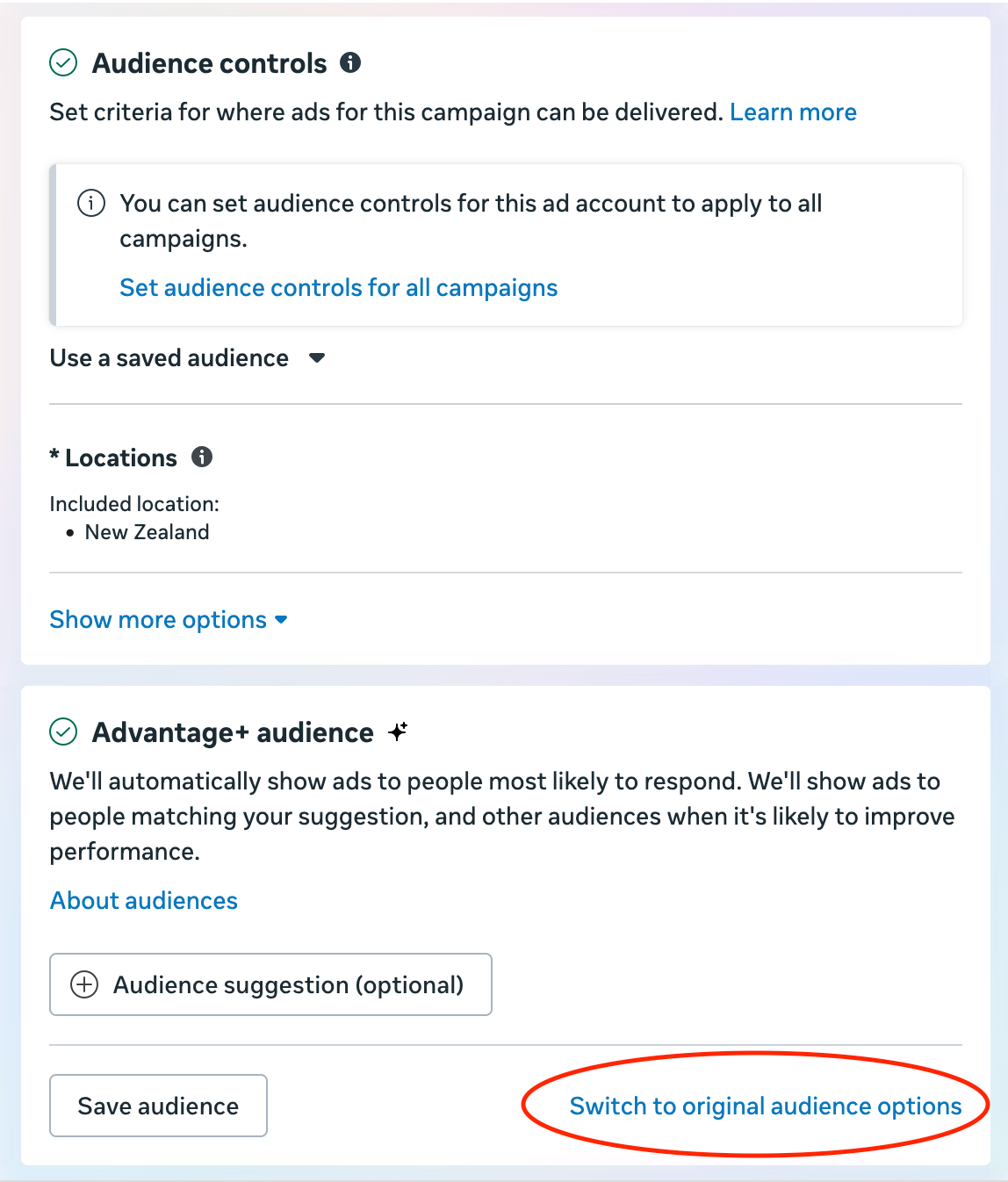
- Under Audience Controls, click Switch to Original Audience Options > Use Original Audience.
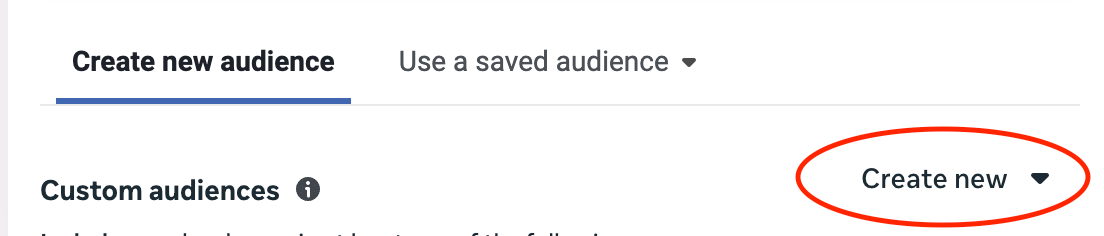
- Under Create New Audience, click Create New > Custom Audience
6. Under Your sources, Select Website
7. These are the people you will send your Remarketing ads to. Set the Source to the name of your Pixel (there's probably only one option, pick that). Keep Events as All website visitors. Set Audience retention to 60 days. This means, "Remarket to every person who came to my website over the past 60 days".
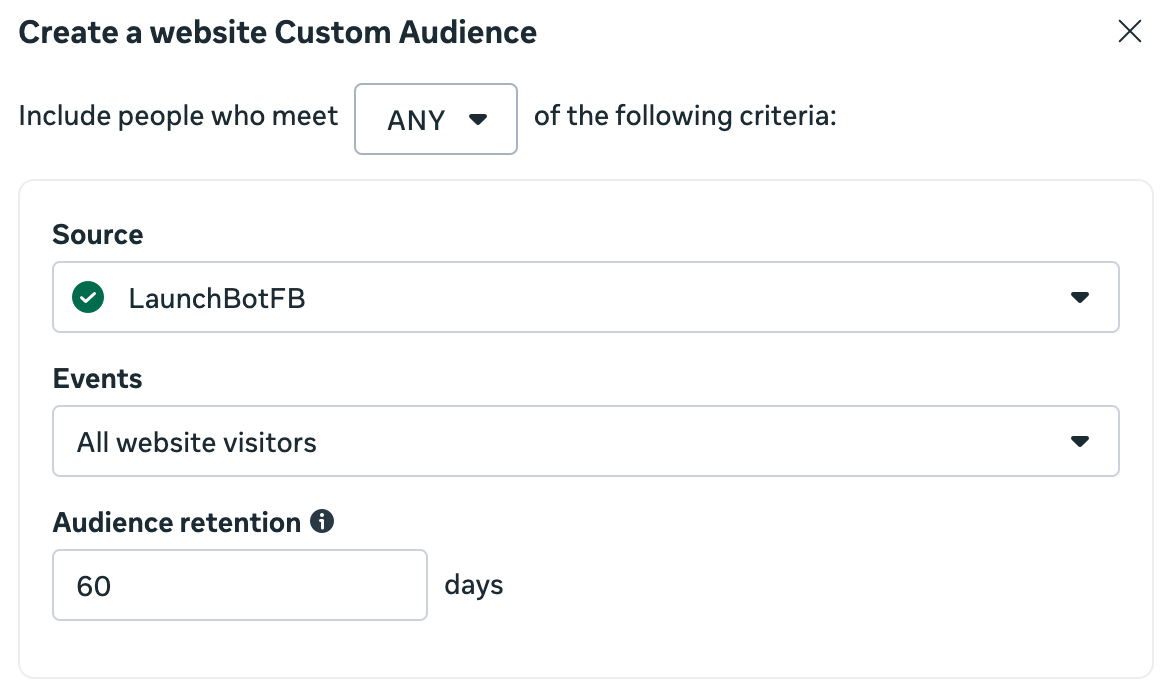
7. Give it a name like "Web visitors 60 days" and click Create Audience. Meta will automatically keep this list updated with all your website visitors in a 60 day period.
Exclude existing customers
- But we don't want the reminder ad to go to people who have already joined or signed up! So we'll make a second list to exclude these people.
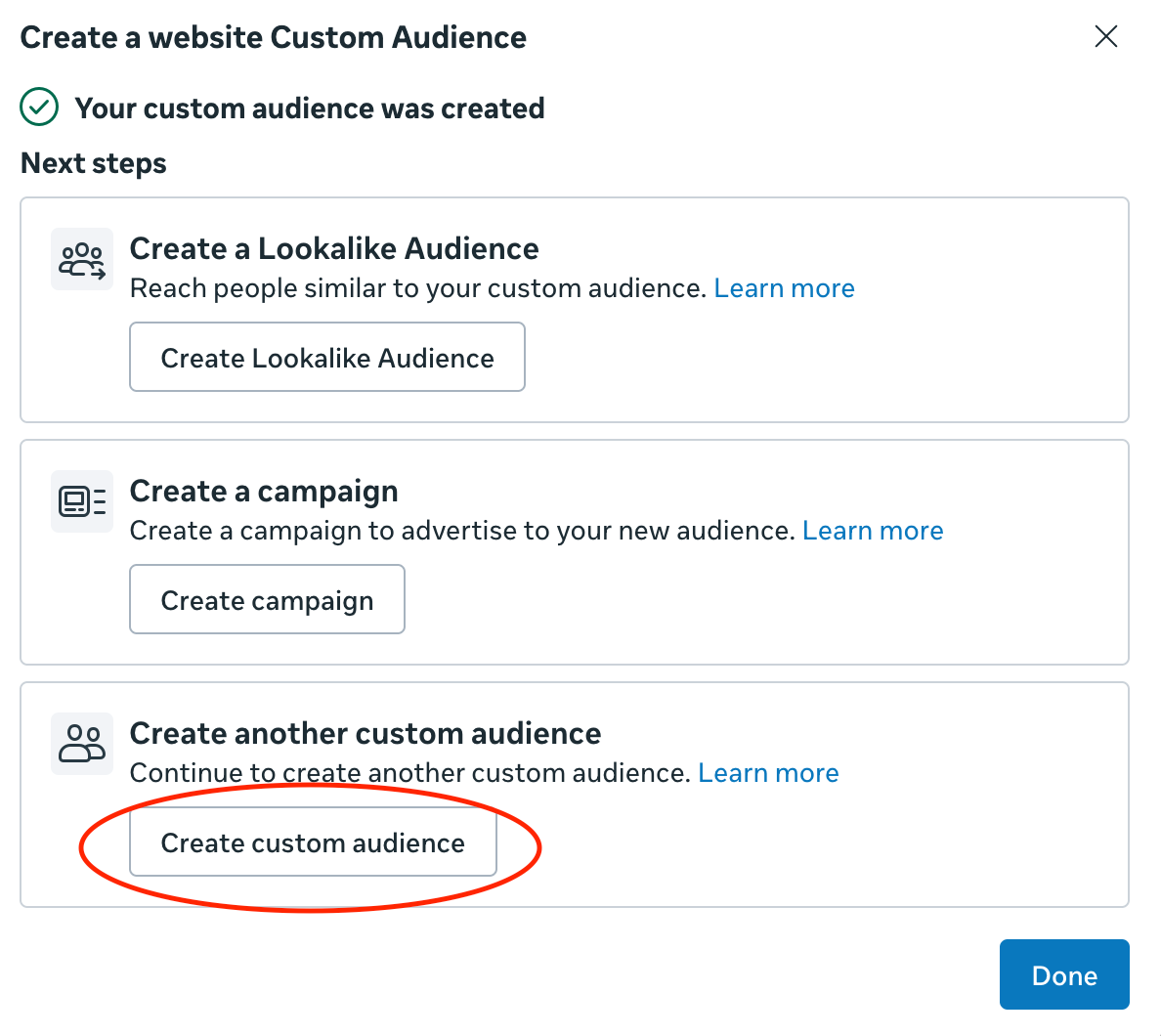
- In the "Your custom audience was created" screen, click Create another custom audience > Create custom audience. If you've already exited this screen, just go back to step 5.
3. But this time, instead of selecting 'Website' under Your Sources, select 'Customer list' and click Next
4. In Prepare your customer list just click Next
5. Download your customer, subscriber or sign up list as a CSV from where ever you keep it. Open it in Excel or Numbers. Keep the name, email, city, state and country, if you have this data. You need the email, the others are a bonus. Delete all the other columns. This information helps Meta find the Facebook profiles of your customers, so that it can ensure it doesn't send the ad to them. It doesn't share this information with you, ever, but you need to make sure it's in line with your privacy policy to do this.
6. Change the column titles (in row 1) to 'fn' for first name, 'ln' for last name, 'email' for email, 'ct' for city, 'st' for state, 'country' for country.
7. Drag the list into the drag and drop section. Keep customer value at No. You can choose an appropriate audience label if you like. Name it something useful, like 'subscribers_dec25'. It's ideal to update this monthly so it's good to include the date.
8. Click Next. Make sure the columns are all correct. Select 'Do not upload' for any columns that Meta has a problem with. Click Import and create.
Add custom audiences to your ad set
- Back in Meta Ads Manager, in your Ad Set, under Audience, your "Web visitors 60 days" audience should be sitting in Custom audiences. If not, add it.
- Untick 'Reach more people likely to respond to your ad', and click the X next to the location it's chosen for your ad. You don't want it to target or expand your audience - this ad is just for your website visitors who didn't convert.
- Click Add Exclusions > Search existing audiences, and select the 'subscribers_dec25' list that you just made.
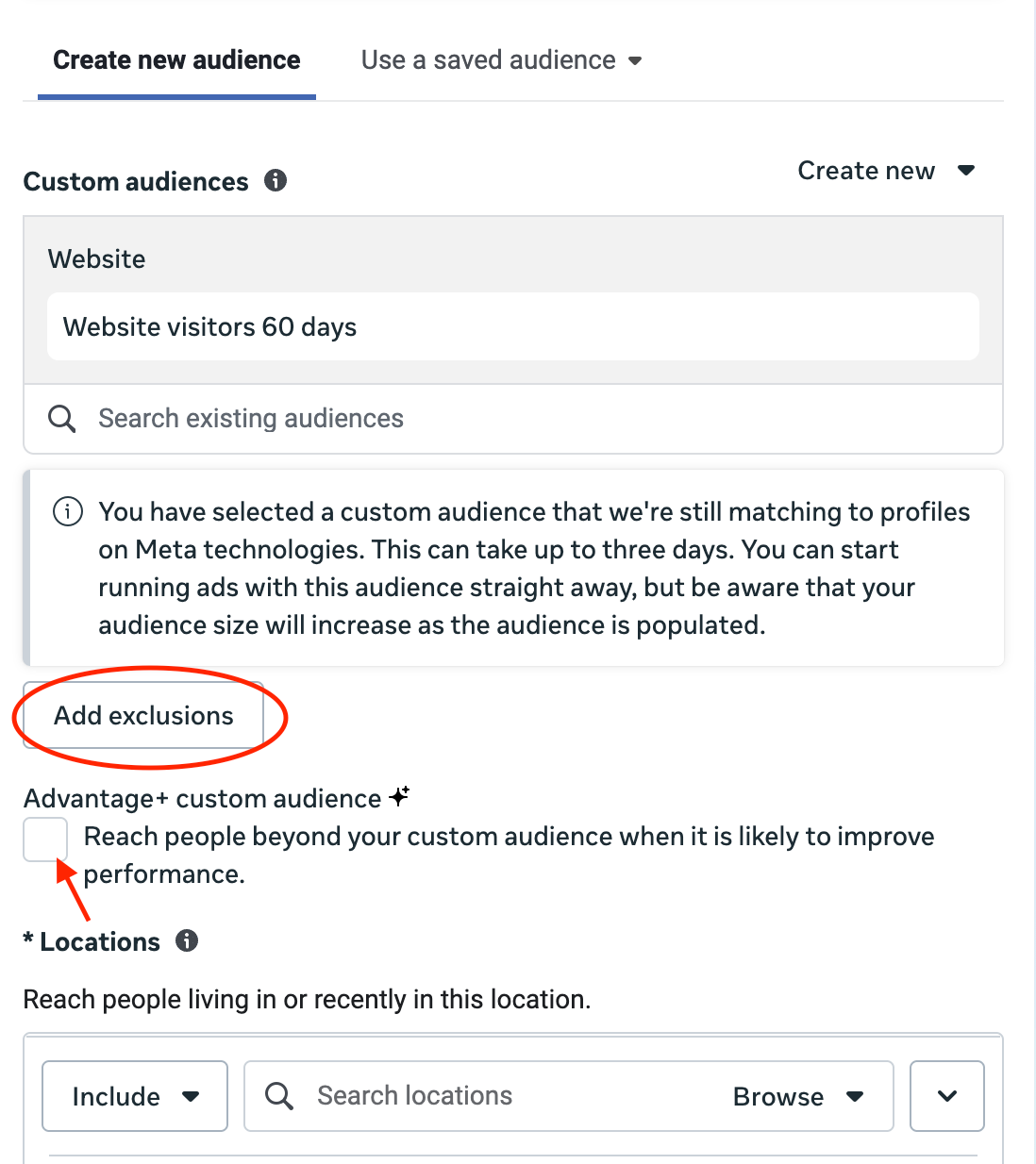
4. Fantastic! Now you've set the ad to include all your website visitors over the past 60 days, but exclude all your current customers. So the ad will just go to people who didn't commit, giving them a gentle reminder.
5. You can now set the budget low, $3 or $6 a day. Update the customer list monthly, and forget about it.
6. Well done! You've just set up an advanced Remarketing campaign!

How to stay ready for Google's AI Results
I've said it before and I'll say it again - Google's search AI is SEO on steroids. By getting your site well set up for SEO and GEO, you should start appearing in Google's AI Results. Experts say it takes 6 months to make an impact on search but some Launchbot users have started seeing their website appear on the front page of search and in AI results in just 3 weeks.
Use Launchbot's Get Found Online tool to make sure your site is optimized for SEO (search engines) and GEO (AI engines).
The Get Found Online tool does keyword research for you, and tells you how to update your website with page-by-page instructions tailored to your website platform (Squarespace, Shopify etc). It's an incredible $2000 worth of value that we've automated to make it affordable for businesses like yours.
Want more of me?
I've been working one-on-one with some select clients as a Growth Advisor.
Providing Executive-Level Growth Advice
- Top-tier strategy so you can maximize your growth
- Establish data-driven feedback loops so you know where the opportunities are
- Have the data to drive good decision making
- Know how to optimize your product for sales
- Feel confident hiring for marketing and knowing where the gaps are
- An expert in your corner to support your growth to go in the right direction (up)
- Advice on where AI and automation can optimize your marketing workflows (and where it can’t)
- Grow to the point where you can hire a CMO
- Marketing won’t fall through the cracks
Training Founders with the Tools to Drive Growth Marketing for your company
- You won’t need me by the end of the year
- You’ll have the data to drive good decision making
- Reduce your cost of acquisition (CPA)
- Know where your product is failing and how to improve it
- Optimize your website for sales
- Feel confident running marketing experiments
- Obliterate wasted marketing spend
- Keep the team small
- Fire your agency
- The foundational tools to drive growth marketing for your company
I can work with 5 clients next year, and 2 spots have already been filled! If this is of interest to you please reach out for a chat this week.

Thanks everyone, happy growing!
Maddy